
A compact duck design made from a short text description.
274 pieces · 70 steps
Lingo Lego · Independent brick design tool
Turn text or a photo into a 3D brick model. Rotate the preview, follow building steps, and download PDF instructions and a parts list. Explore real samples.
Lingo Lego is a web-based AI brick model generator. Describe an object or upload its photo, choose your sizes, and explore the resulting three-dimensional brick layout. The preview, numbered instructions and parts list are derived from the same design.
Each new input first generates its own three-dimensional source. The service then converts that shape and its colors into a brick model. Selected sizes share the source and have their own layouts and instructions.
Use words when you have an idea to describe. Use a photo when you want to preserve a familiar silhouette or visible colors. Both starting points lead to an interactive preview and digital building instructions.
Rotate the finished design to inspect its shape, follow the online steps, and download the PDF booklet, CSV parts list and instructions package. Open a public example to inspect the output before creating your own.
| Stage | What you can do | Example |
|---|---|---|
| Text or photo | Describe or show one subject. | A duck description or a bottle photograph. |
| 3D brick preview | Rotate the model and examine the pieces. | Inspect the actual layout in the interactive example. |
| Building instructions | Follow numbered steps and download matching files. | Read the PDF and CSV from the same example. |
A tool may create an illustration, a flat mosaic, a concept model or a brick layout with instructions. Check the actual output: can you inspect the pieces, follow the sequence and read a matching parts list?
Lingo Lego provides the brick layout, preview and corresponding instructions. Digital checks do not verify real-world stability or every construction state; review your generated design before attempting a physical build.
Describe the main shape, colors and defining details, or use a well-lit photo with the whole subject visible. Compare the result with your idea before following the instructions. Small details and hidden surfaces may be simplified.
Lingo Lego creates a three-dimensional brick layout with individual pieces. You can rotate the preview, follow building steps and download the corresponding PDF and parts list.
Yes. Choose Text or Photo when you start. Describe one object or upload a clear photo, then select the model sizes you want.
Yes. Results include numbered PDF building instructions and a CSV parts list derived from the brick layout. Physical stability has not been verified, so inspect the result before using it for a physical build.
Creation uses credits. The current quote is shown before you submit. Public examples and the sample PDF, CSV and ZIP on this page can be viewed without a purchase.
No. Lingo Lego is an independent digital design service. The LEGO Group does not sponsor, authorize or endorse it. Physical bricks, procurement and delivery are not included.
A compact duck design made from a short text description.
274 pieces · 70 steps
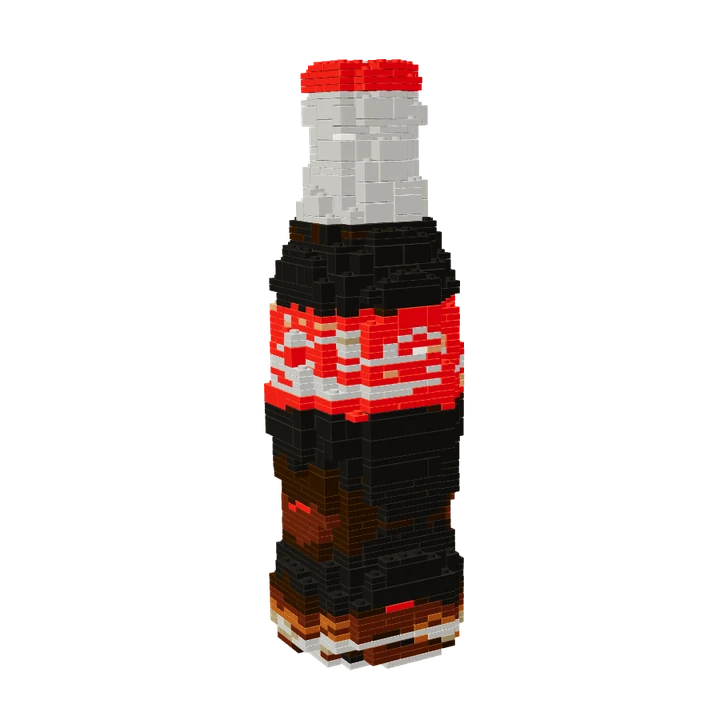
A familiar bottle silhouette turned into a medium-size brick design.
1,172 pieces · 273 steps

The photo-based turtle used in the homepage story, with its actual medium-size brick layout.
670 pieces · 156 steps
Reviewed by the Lingo Lego team · Updated